The free forums are no longer in use. It remains available as read-only archive.

 Log In


 Topic RSS
11:34 pm

December 14, 2010
 Offline


I have changed computers, but need to continue the local development of a Wordpress site.
I'm stuck at the FTP-hostname under the Clone section. What is the FTP-hostname for localhost?
Any help would be much appreciated.
Thanks,
Jack
8:09 am

September 26, 2010
Offline


You probably don't have a ftp server on your localhost, so you need to skip this step, this restore tutorial will help https://docs.xcloner.com/#/
Regards, Ovidiu
3:53 pm
December 14, 2010
Offline
Ovidiu,
Thanks so much. I've gotten to the last step, but don't know what my "Install URL" should be. Should it just be my wp-config.php file?
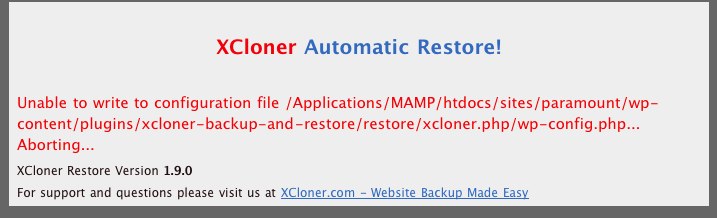
This is the error message I can receiving.
3:55 pm
September 26, 2010
Offline
It would be better to put the restore script directly in the folder where you want to restore your site, it will automatically reconfigure itself, and make sure you call it with the correct upper case letters as XCloner.php and not xcloner.php
Post a screenshot here after your default restore screen if you still have issues
Ovidiu
4:43 pm
December 14, 2010
Offline
XCloner! Support said:
It would be better to put the restore script directly in the folder where you want to restore your site, it will automatically reconfigure itself, and make sure you call it with the correct upper case letters as XCloner.php and not xcloner.php
Post a screenshot here after your default restore screen if you still have issues
Ovidiu
Can you give me an example of what folder that might be for Wordpress? I apologize for my ignorance. Just my first experience with developing a website...
Thanks
5:05 pm
September 26, 2010
Offline
Not sure if i can give you a good example, if you are planning to install wordpress on a root domain, then you need to upload those files in the corresponding location on the server, usually also called webroot
Can you us more details where you want to install wordpress exactly?
Maybe this tutorial will help http://codex.wordpre.....ordPress , check also here http://www.solostrea.....wordpress/
Ovidiu
5:40 pm
December 14, 2010
Offline
XCloner! Support said:
Not sure if i can give you a good example, if you are planning to install wordpress on a root domain, then you need to upload those files in the corresponding location on the server, usually also called webroot
Can you us more details where you want to install wordpress exactly?
Maybe this tutorial will help http://codex.wordpress.org/Ins....._WordPress , check also here http://www.solostream.com/blog.....wordpress/
Ovidiu
On my mac, Wordpress is installed under the following:
/Applications/MAMP/htdocs/sites/paramount (I've renamed "Wordpress" to "paramount")
/Applications/MAMP/htdocs/sites/paramount/administrator/backups/ - backups has the following files in it:
backup-3.tar
mysql-sql.sql
paramount-sql.sql
TAR.php
XCloner.php
5:42 pm
September 26, 2010
Offline
OK, so the restore script(XCloner.php and TAR.php) goes to this directory /Applications/MAMP/htdocs/sites/paramount along with the backup archive! When you will get to the restore screen, choose the "Install files directly" option.
Also, wordpress does not need to be installed before the restore, so clean that directory first of all files and create a new empty database for restore.
Ovidiu
7:45 pm
December 14, 2010
Offline
Got it. THANK YOU.
Where are my text widgets now?
7:52 pm
September 26, 2010
Offline
Please check a similar post here /support/forums/wordpress-support/text-widget-not-populated-after-clone-success/ and see if you can check the database for the text widgets record
Let me know what you find! Ovidiu
2 Guest(s)
