(SQL)Backups auto-delete and tar size no more than 1.5kb - help please!|Wordpress Support|Forum Archive|XCloner

The free forums are no longer in use. It remains available as read-only archive.

Avatar
Lost password?
Advanced Search
Forum Scope


Match


Forum Options


Minimum search word length is 3 characters - maximum search word length is 84 characters
The forums are currently locked and only available for read only access
sp_Feed Topic RSSsp_TopicIcon
(SQL)Backups auto-delete and tar size no more than 1.5kb - help please!
August 21, 2012
2:49 pm
Avatar
Freddy
New Member
Members
Forum Posts: 2
Member Since:
August 21, 2012
sp_UserOfflineSmall Offline

hi!


This is my first post, so first off *THANKYOU* for creating this amazing software!  Thankyou again for bothering with your forum and putting in the time to support your followers/users.  It doesn't happen very often any more – so thanks for being different!


But…


I still have a problem.
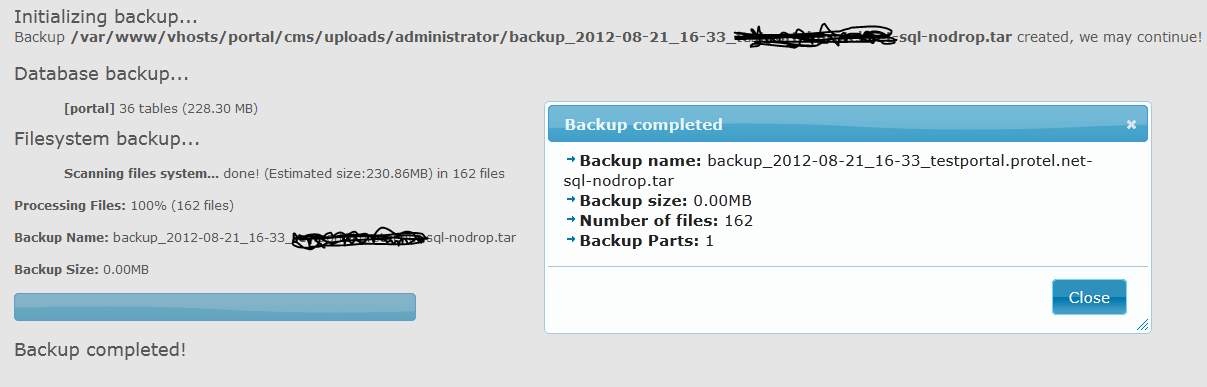
pictures-more-than-wordsImage Enlarger


When I watch the temp directory via FileZilla, I see the ***.sql file being created, and see it grow.

Once the "tar" kicks in, those files dissapear, the tar stays in the temp directory – and NOTHING is created in the final backup directory.

All directories are 777 (just for testing!) and I don't know what the problem is.
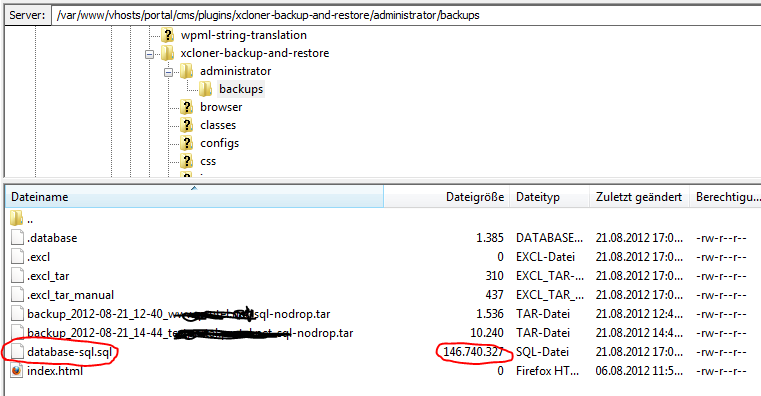
 

filezilla-ftp-files-being-createdImage Enlarger


Should I define a path to tar, and set it active? (/bin/tar)

I tried this too, but to no avail 🙁

 

another-picture-to-show-silly-tar-sizeImage Enlarger


Any pointers greatly appreciated, thanks!

August 21, 2012
5:31 pm
Avatar
Ovidiu Liuta
Member
Forum Posts: 2484
Member Since:
September 26, 2010
sp_UserOfflineSmall Offline

Could you attach a screenshot after your XCloner Config? try and disable the Active box for server utilities if you've enabled that...


Hope it helps! Ovidiu

August 31, 2012
8:51 am
Avatar
Freddy
New Member
Members
Forum Posts: 2
Member Since:
August 21, 2012
sp_UserOfflineSmall Offline

Here's the screengrab:

(oops! get access denied message -will try later - ahh - used tinypic workaround)

[Image Can Not Be Found]

All paths are valid.

Same problem tho - as above :/

September 1, 2012
2:34 am
Avatar
Ovidiu Liuta
Member
Forum Posts: 2484
Member Since:
September 26, 2010
sp_UserOfflineSmall Offline

Could you also attach a screenshot after the General Config tab?

Forum Timezone: America/Chicago
Most Users Ever Online: 867
Currently Online:
Guest(s) 13
Currently Browsing this Page:
1 Guest(s)
Top Posters:
mlguru: 30
Django29: 29
D: 21
Andy: 21
Marcus: 20
Jamie F: 19
Member Stats:
Guest Posters: 738
Members: 10080
Moderators: 2
Admins: 3
Forum Stats:
Groups: 3
Forums: 7
Topics: 2397
Posts: 8236
Newest Members:
Manuele Freddo_1
Moderators: TriP: 0, Steve Burge: 0
Administrators: Ovidiu Liuta: 2484, Victor Drover: 1, Valentin Barbu: 0