The free forums are no longer in use. It remains available as read-only archive.
 Log In


 Topic RSS
3:48 pm

December 17, 2011
 Offline


Hello there,
after searching this forum for a possible solution to my issue I decided to write a new post, because I found nothing…
After installing XCloner on a WordPress site, it says that
Invalid directory (/web/htdocs/www.mydomain.com/xclonerbackups/)
Invalid directory (/web/htdocs/www.mydomain.com/administrator/backups)
But these folders exist AND have 775 permissions… Tried to set 777 to both folders, nothing changed.
I miss something? Could be some restrictive server setting made by hoster?
Thanks in advance.
10:11 pm

I have a similar but different issue related to the incorrect or unreadable directory message. I am running WordPress on a Windows server.
I want my start directory to be wwwroot, which would allow me to backup all subfolders. At this point it will only allow me to define the wp-content folder as the start folder.
Regardless of where I try to place the start directory (outside of the wp-content folder), the Temporary Folder reports a problem with the path. Which means, I can only backup the contents of the wp-contents folder.
Any thoughts? On how I can backup all the folders in the WP root directory (on a Windows install)?
Temporary Folder \\administrator\backups
incorrect or
unreadable
Backup Start Path /
is readable
Backup Path: C:/HostingSpaces/domainr/domainr.com/wwwroot/backups
is writeableed
Thanks!
T
9:21 am

September 26, 2010
Offline


Hi Ted, you need to use an absolute path for your Backup Start Path, so in your case that would be C:/HostingSpaces/domainr/domainr.com/wwwroot/ .
Make sure you also create the temporary directory C:/HostingSpaces/domainr/domainr.com/wwwroot/administrator/backups/ before you start the backup process.
9:23 am
September 26, 2010
Offline
burn: usually the invalid directory message usually means something is wrong with the configured paths, could be a typo in the names, or something else, is your site webroot pah correctly setup? might want to check that with your hosting support...
Ovidiu
12:22 pm
December 17, 2011
Offline
XCloner! Support said:
burn: usually the invalid directory message usually means something is wrong with the configured paths, could be a typo in the names, or something else, is your site webroot pah correctly setup? might want to check that with your hosting support...
Ovidiu
Thank you, I fixed the issue. There were some server particular settings made by my hosting service. Also, I removed the last slash / at the end of the Backup Store Path.
5:37 am
Hi Ovidiu - thank you for your feedback. I have checked and recheck my parameters but not found any problems with my xcloner settings. I am wondering if my challenge is not similar to what Burn was expereincing.
Burn, would you mind telling me what parameters you needed your hosting service to change for you?
Thanks,
Ted
11:33 am
September 26, 2010
Offline
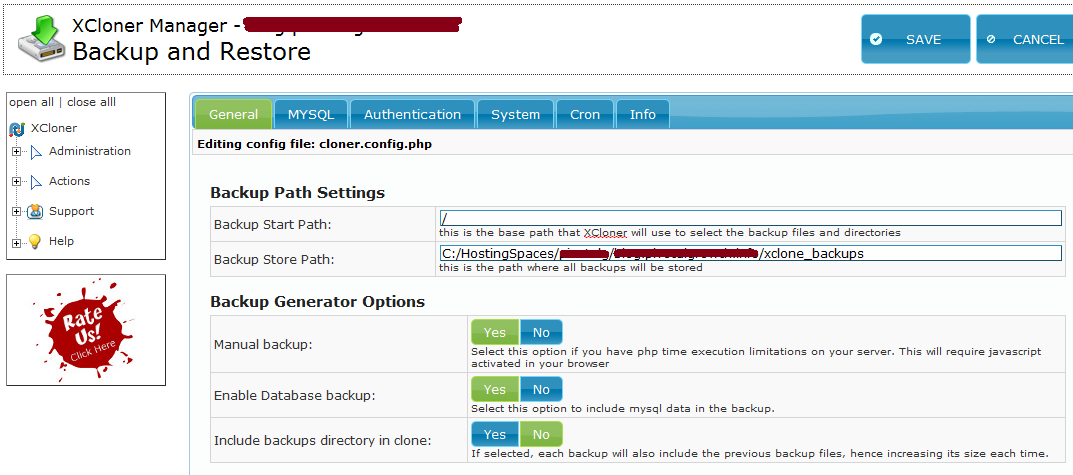
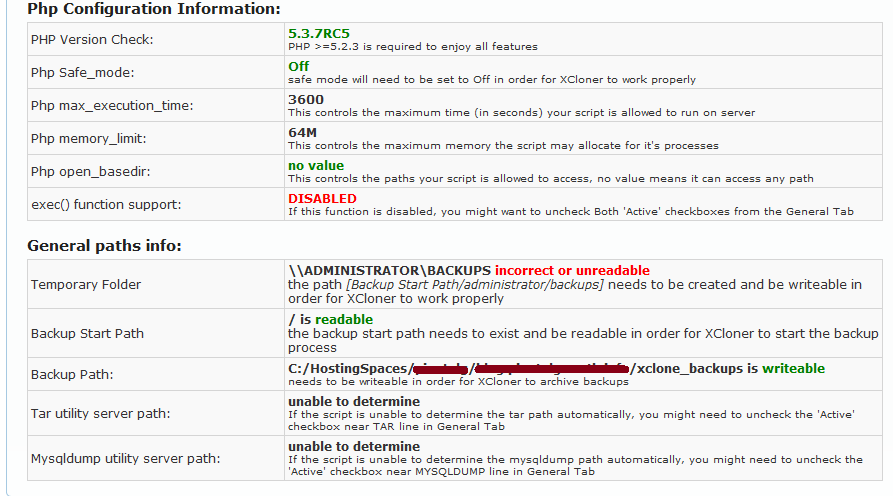
Ted: can you post some screenshots after your current XCloner Config General tab as well as the Info tab?
Ovidiu
3:42 pm
Hi Ovidiu,
I can do one better than that - it is my test sight. I can send you an email with a link to my site, userid and password. I can change it all after we have worked it out. Sound good? I just need an email address.
I would love to have you tell me what I am missing...I'm thinking it is going to require a change on the server, which I may need to request from my hosting provider.
Ted
10:03 pm
September 26, 2010
Offline
Ted, if you like, feel free to submit a support ticket on our site, I would be happy to help you further!
Regards, Ovidiu
5:55 am
Ovidiu, I need help. I am providing you with the screenshots you originally requested. Would you take a look? The Backup Start Path below is not the one I enter in but the one it defaults back to after I save. I would appreciate your thoughts. I am running on a Windows Server if that matters. Thank you. Ted
1 Guest(s)
